A Practical Guide to Work Order Management for MRO. Step by Step in Smart 145

Managing the aircraft component repair workflow isn't just about the technical work. From intake and inspection to quotation, execution, certification, invoicing, and final shipment, each stage requires coordination across multiple departments while maintaining accurate operational and financial records.
Smart 145 brings together the full work order management for MRO in a single platform. As aircraft maintenance software, it links Work Orders with inventory, purchasing, labor tracking, accounting, and shipments, allowing repair stations to manage the entire lifecycle of a unit in one structured environment. This article is a step-by-step guide to handling aircraft component repair workflows.
How Does Work Order Management for MRO Really Work?
In aviation MRO operations, the aircraft component repair workflow follows a clear sequence —from intake and inspection, through scope definition and quoting, into execution and quality checks, and ending with documentation, invoicing, and financial closeout. Each stage of aircraft maintenance management involves coordination between operations, purchasing, quality control, sales, and accounting, while generating technical records and financial impact that must remain accurate and traceable.
When these steps are handled across different systems—or even manually—it becomes harder to keep everything aligned. Teams lose visibility, and financial data can easily fall out of sync with what’s happening on the shop floor.
Smart 145 centralizes work order management for MRO within a single ERP platform, where the Work Order connects workflow progression, material and labor tracking, purchasing activity, and accounting impact in one structured environment. From receipt to closeout, operational execution and financial records remain synchronized.
In the sections below, we’ll go through that process step by step, using Smart 145 to show how a component can be tracked from receipt all the way to invoicing, while highlighting best practices to maximize visibility, control, and profitability.

1. Component Intake & Work Order Creation
When a unit arrives at the shop, the first priority is to formally register it in the system. In a standard MRO workflow, this can happen at different moments depending on how the repair begins. Some shops start commercially, generating a quote that is approved before execution.
Others prepare draft scopes for recurring repairs. In many shops, the process begins directly at intake when the unit physically arrives, where a receiving inspection is performed at intake to verify documentation, condition, and traceability before or alongside Work Order creation.
As work order management software for aviation, Smart 145 supports all of these operational models. A Work Order can be created directly from an approved Customer Quote, converted from a Receiving Verification, or generated directly from the Work Order browser during physical intake. No matter how the process starts, the goal is the same: to create a clear and traceable record for that unit from the very beginning.
During Work Order creation, key operational information must be registered, including the Part Number, Serial Number (if applicable), quantity, customer, work requested, assigned shop, priority level, customer RO number, as well as additional required fields. Smart 145 also allows optional fields to be filled in to provide further reference, ensuring that the Work Order contains all relevant contextual information from the beginning.
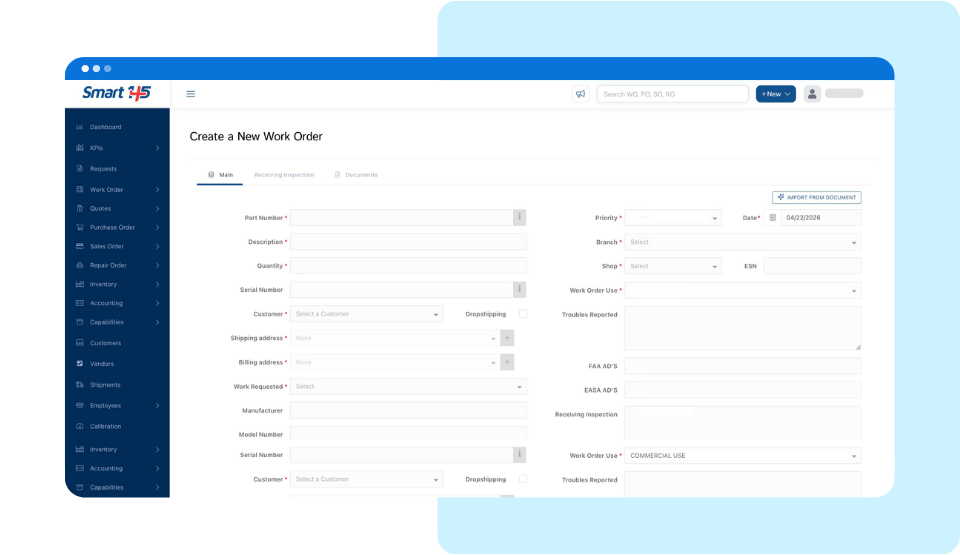
Smart 145 can also be configured to align with your internal compliance requirements. Depending on your setup, the system may require that a valid Capability Manual be associated before a Work Order can be opened for a specific unit, verify that the applicable manual is current, or allow creation without compliance restrictions. This way, each repair station can configure the system to match how they actually operate and the regulations they work under.
Regardless of how the Work Order originates, it becomes the central control point for the entire repair. All inspection findings, cost evaluations, purchasing actions, labor tracking, inventory movements, documentation, and financial transactions will be connected to this single record.
2. Initial Inspection & Scope Definition
Once the Work Order has been created and the unit is formally registered, the next stage in work order management for MRO is inspection and evaluation. This phase determines the actual condition of the component and defines the technical scope of work required to return it to service.
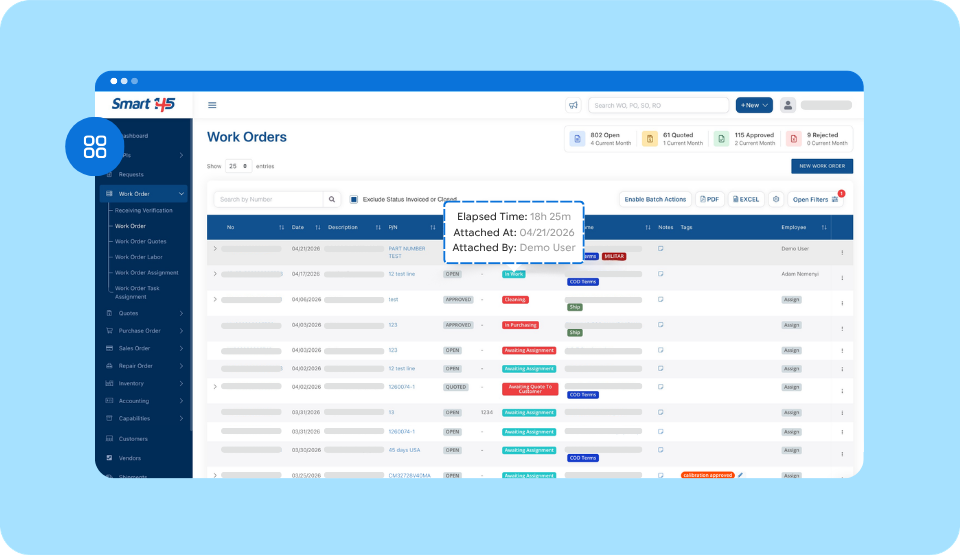
As the Work Order progresses into inspection, Smart 145 manages workflow transitions through configurable Process Steps. The system assigns the initial step automatically based on your predefined setup, and from there the order can move to subsequent stages either automatically—if conditions are configured—or manually by authorized users.
Each transition records who performed the change and when it occurred, while the system continuously displays how long the Work Order remains in its current step. This visibility also supports monitoring Turnaround Time (TAT), which is a key performance indicator in most repair operations.
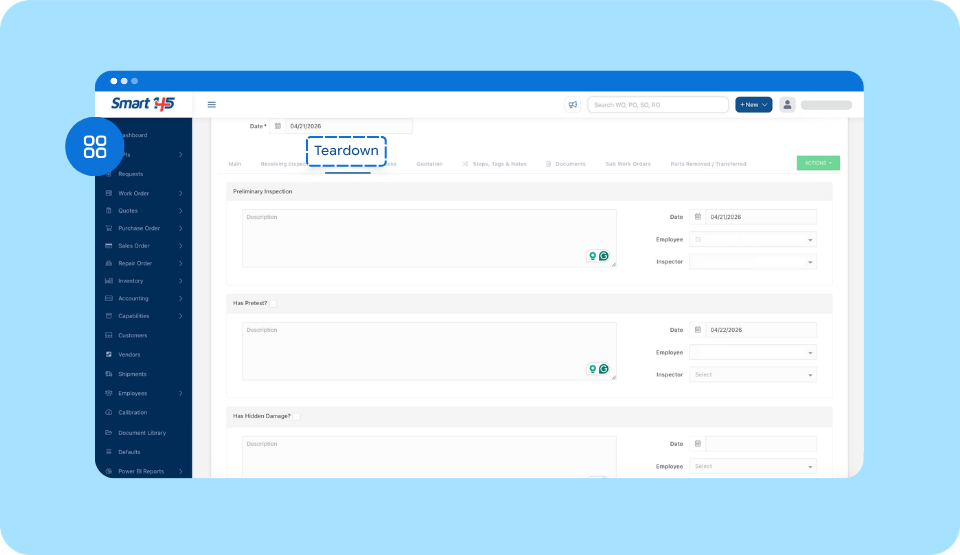
Preliminary inspection findings can be documented within the Teardown tab, using the structured sections designed for recording discrepancies, evaluation results, and technical observations. These sections can be adapted to match the company’s internal workflow, ensuring that the inspection process reflects how the shop operates.
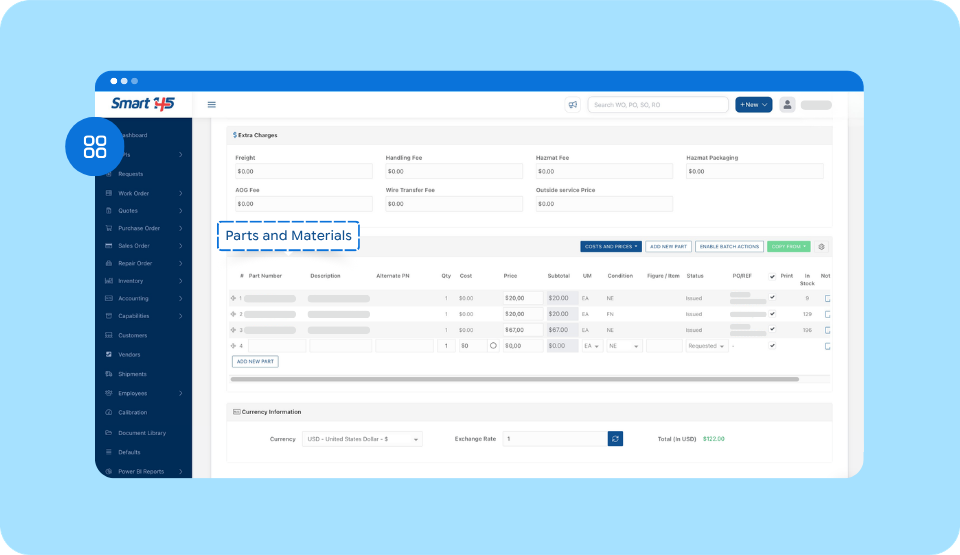
As the technician determines which parts require replacement—or identifies additional materials needed—they can register them directly in the Parts and Materials section of the Quotation tab.
If the repair requires subcontracted work, the corresponding outside service can also be specified at this stage. Estimated labor hours or specific tasks that will need to be performed can be added as well, allowing the system to prepare a structured scope that will later transition into the formal quoting stage.
In work order management software for aviation, like Smart 145, keeping all inspection findings, required parts, outside services, and estimated labor inside the Work Order ensures nothing gets lost between teams.
Task Templates can even be configured to populate the Work Order during creation, helping maintain consistency, reduce manual entry, and standardize recurring repair scopes.
3. Cost Evaluation & Quotation
After defining the scope —parts, labor, and any outside services— the next step is building the quote. In Smart 145, this is done directly within the Quotation tab of the Work Order, where the technical scope transitions into structured pricing.
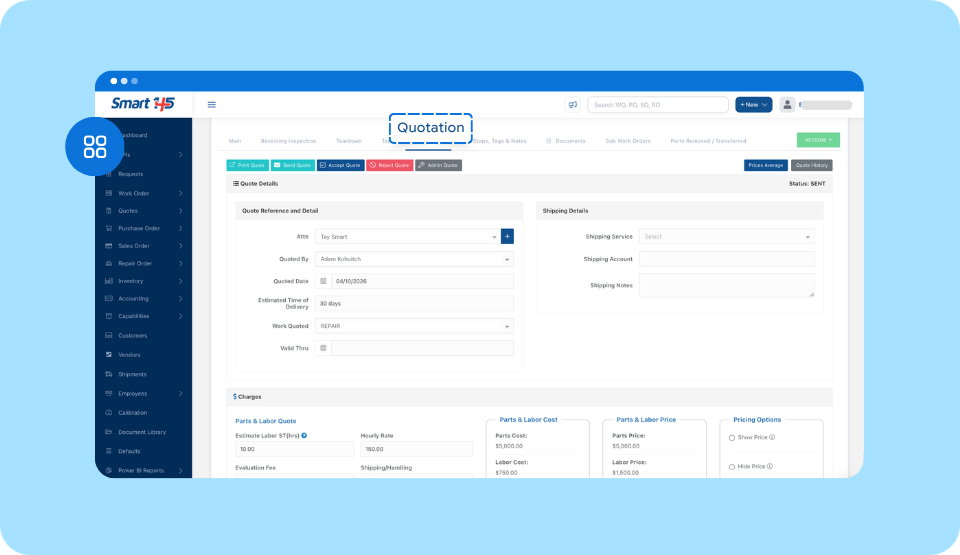
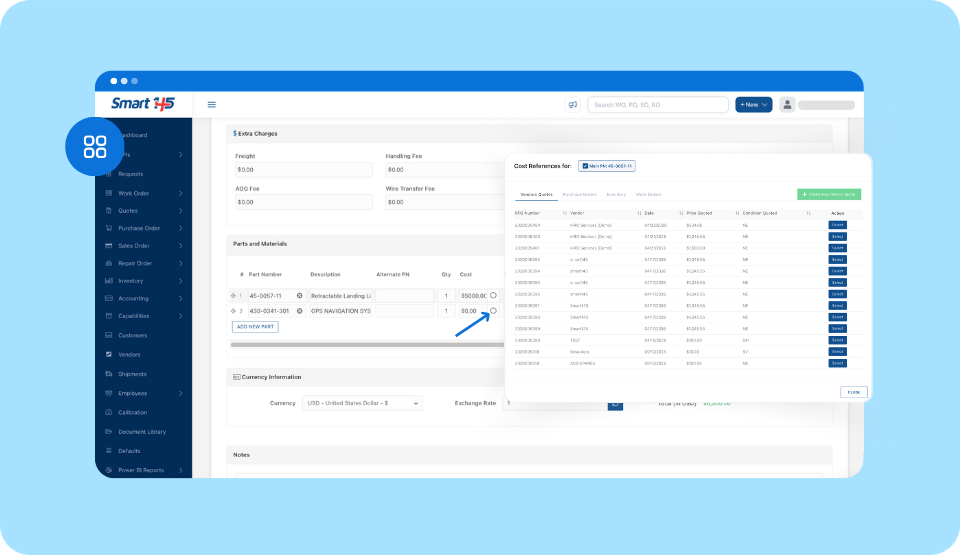
For assigning costs and prices to the parts required, users can choose the cost basis from documented references such as Vendor Quotes, Purchase Orders, inventory records, or historical Work Orders, which ensures pricing is built on traceable system data rather than manual estimates.
Once the cost is selected, a markup percentage can be applied to automatically calculate the selling price, giving precise control over margins and ensuring that the amount billed to the customer is structured and financially consistent.
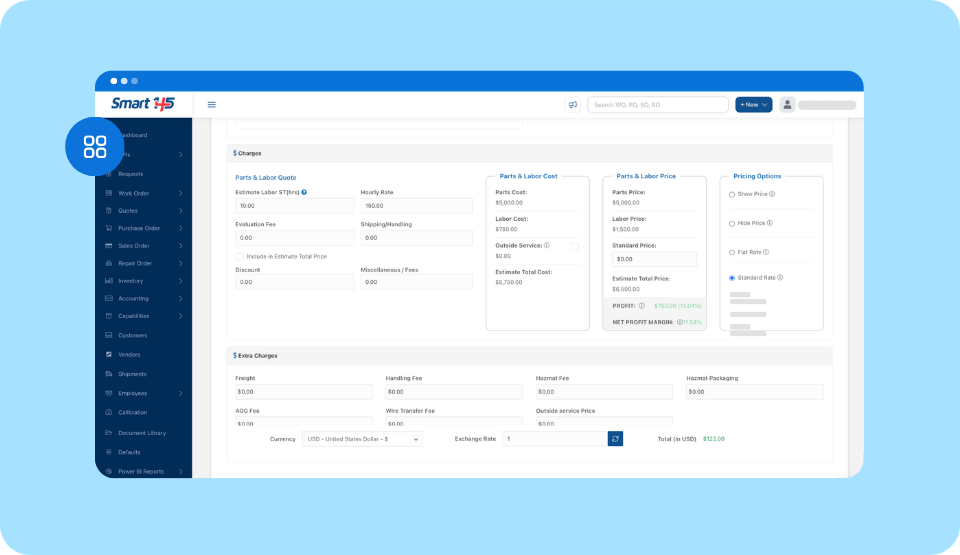
In regard to the labor price and its corresponding cost, Smart 145 allows companies to structure both according to their operational model. The Labor Price billed to the customer is calculated based on the Estimated Labor Standard Time (ST hours) defined for the order and the hourly rate configured for that specific customer. If configured accordingly, the system also allows users to manually input the Labor Price, providing additional flexibility to define pricing based on specific operational or commercial requirements.
Internally, labor cost can be calculated in different ways depending on how the shop operates. Some base it on actual wages and hours worked, others apply a percentage over the labor price, and some calculate it based on task-level assignments.
This flexibility allows each shop to maintain accurate internal cost control while ensuring consistent and structured customer billing.
If outsourcing is required, a Repair Order (RO) can be created to register the work requested from an external facility. That RO is linked directly to the Work Order, and the outside service cost can be automatically added to the total cost of the job. The system also allows you to define whether that outsourced value should be included in the final price quoted to the customer.
Once costs are selected and markup percentages are applied at the line level, Smart 145 automatically calculates the selling prices. The system also offers flexible pricing presentation options: you can generate a quotation that shows detailed prices, hide pricing values when required, or establish a Flat Rate for the entire Work Order that remains fixed regardless of variations in parts or labor prices.
Additionally, you can define which replaced parts should be displayed in the customer-facing report, allowing you to control how technical details are presented.
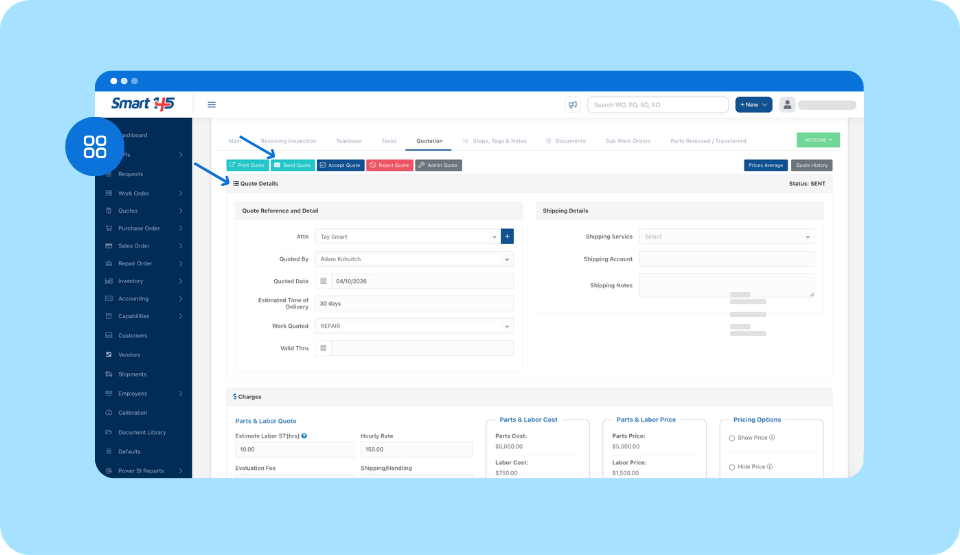
After reviewing totals, scope details, and pricing configuration, the quotation can be generated and sent directly from within the Work Order to request customer approval.
Smart 145 integrates with major aviation marketplaces such as ILS, PartsBase, Rotabull, and the145, allowing purchasing teams to quickly locate available parts and suppliers when preparing quotes or requesting vendor prices.
4. Customer Approval & Work Authorization
Once the quotation has been sent, the next stage is obtaining customer approval before beginning the repair work. In a standard MRO workflow, this step ensures that the customer authorizes the defined scope of work, associated costs, and expected services before the shop proceeds with execution.
In Smart 145, the customer can review and approve or reject the quotation directly from the same email sent by the shop. The email includes a secure link that allows the customer to access the quote online and provide their approval by signing it electronically.
Once the customer completes this action, the Work Order is automatically updated to reflect the Approved or Rejected status and moves to the corresponding Process Step according to the shop’s configured workflow. Customers may also send their approval through traditional methods such as signed documents or email confirmation, depending on the shop’s process, which can be manually input into the order.

Because workflow transitions are controlled through Process Steps, the system continues recording who performed the update, when it occurred, and how long the Work Order remains in each stage. This keeps the timeline clear and makes sure work doesn’t start before approval is in place.
At this point, the Work Order moves from evaluation into active repair. The approved scope becomes the operational reference for technicians, purchasing teams, and quality personnel as the unit progresses through the repair process.
5. Repair Execution, Quality Control & Final Verification
Once the quotation has been approved and the Work Order moves into an authorized execution step, the repair process begins. At this stage, technicians perform the required tasks, parts are issued, and all operational activity related to the repair is registered within the Work Order.
It’s important to note that if additional findings are discovered during repair, the scope and quotation may need to be revised and resubmitted for customer approval before proceeding.
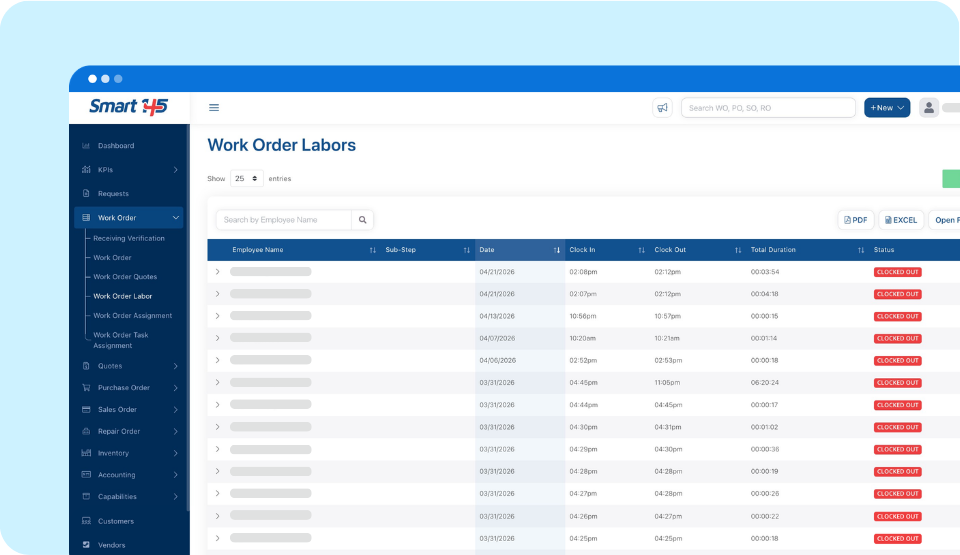
As work progresses, labor activity can be recorded through Smart 145’s labor tracking functionality. Technicians can Clock In to the corresponding task when beginning work and Clock Out once the task is completed.
This can be done directly from the Work Order or through the Work Order Labor sub-module, allowing the system to capture the exact time spent on each task and ensuring precise labor tracking and historical records.
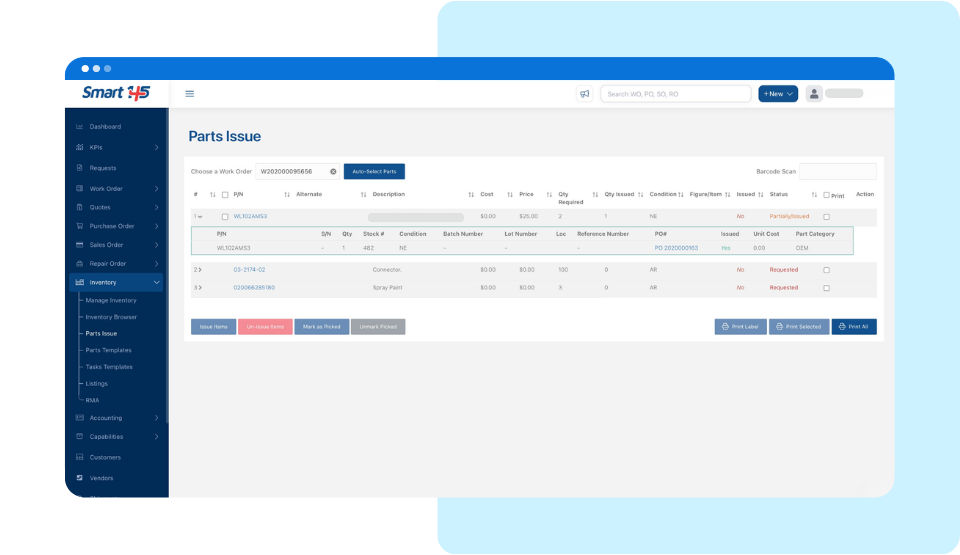
When replacement parts or materials are required, they can be issued from inventory directly through the Work Order. This ensures that inventory movements are properly registered and that the cost of the consumed materials is automatically reflected in the order’s total cost.
If the required parts are not available in stock, the procurement team can create a Purchase Order (PO) to acquire them from a vendor. Smart 145 links the purchasing process with the Work Order, allowing the PO and the received parts to be associated with the repair, ensuring full traceability between procurement, inventory, and the Work Order.
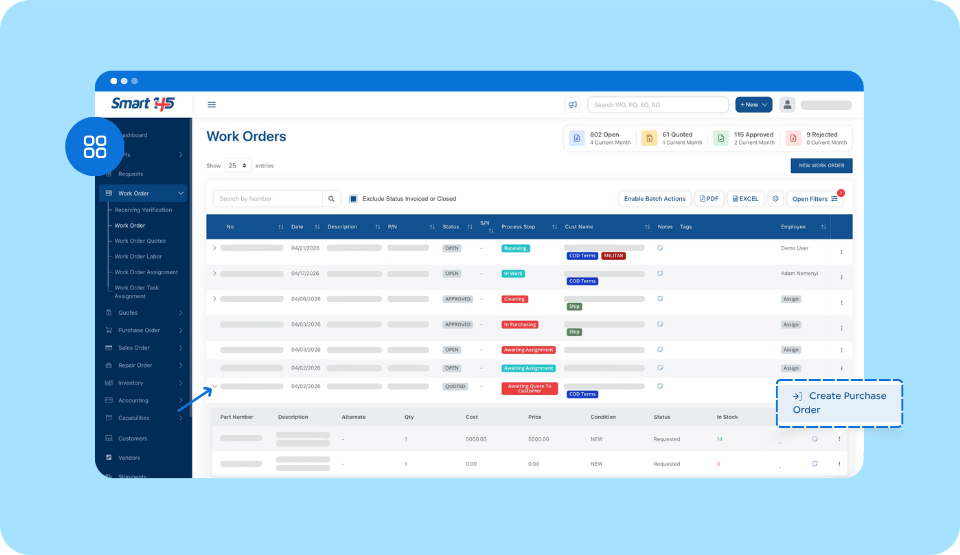
If the repair requires external services, the previously created Repair Order (RO) allows the shop to manage the outsourcing process. The RO records the work requested from the outside facility, tracks vendor interaction, and registers the cost associated with that service. Because the RO is linked to the Work Order, the outsourced service remains fully traceable and financially connected to the repair.
As the repair tasks are completed, the Work Order moves into the Quality Control or Final Inspection stage, where inspectors verify that the work meets the required technical standards. At this point, the documentation required to certify the component for return to service must be completed according to the repair station’s certifications and the work performed.
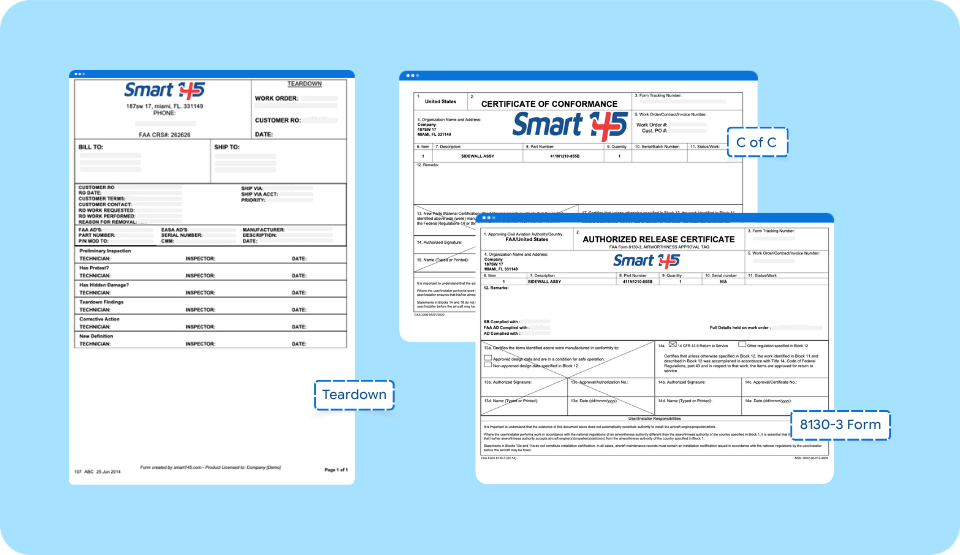
Under 14 CFR Part 145, repair stations are required to maintain documented records of all maintenance performed, making each of these release documents a regulatory obligation rather than just a quality step. This usually includes release documents like FAA Form 8130-3, or equivalents such as EASA Form 1, UK CAA Form 1, or TCCA Form One. Smart 145 aircraft maintenance software allows certification records and supporting repair documentation to be attached directly to the Work Order, keeping the full repair history organized and traceable.
Smart 145 also allows multiple certifications to be selected when repairing and certifying a unit. This is especially useful for repair stations operating under multiple regulatory authorities, as it enables the Work Order to reflect the applicable certifications required for the repair and the corresponding release documentation.
6. Invoicing, Shipping & Work Order Closure
Once the aircraft maintenance management process is complete — repair verified and certified for release — the final stage of the Work Order lifecycle is to prepare the unit for return to the customer. In a standard MRO workflow, this stage includes generating the invoice for the services performed and coordinating the shipment of the repaired component back to the client.
In Smart 145, the invoice can be generated directly from the Work Order, allowing all operational data registered throughout the repair process to flow into the billing stage. Parts issued, labor recorded, and outsourced services linked to the Work Order are automatically reflected in the order’s total value, ensuring that the invoice accurately represents the work performed.
After the invoice is created and the unit is ready for release, the shipment record can be reviewed and updated through the Shipments module. This allows the shop to record shipping details, carrier information, tracking numbers, and delivery references associated with the repaired unit.
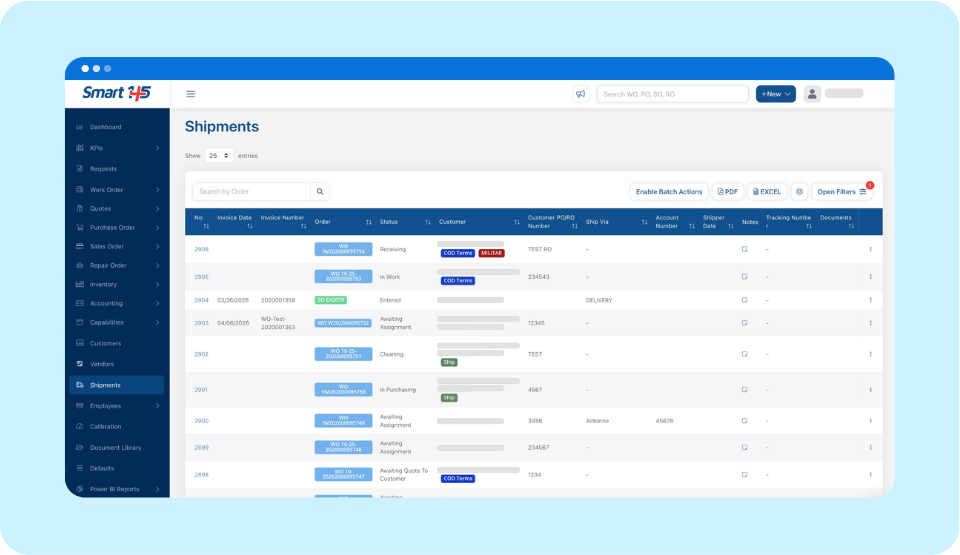
By linking the shipment to the Work Order, Smart 145 maintains a complete record of the repair lifecycle, from intake and inspection through execution, certification, invoicing, and final delivery to the customer.
From a financial perspective, as ERP software for the aviation industry, Smart 145 ensures that operational activity is directly connected to accounting records. When the invoice is generated, the system automatically creates the corresponding Accounts Receivable (AR) record and the associated General Ledger transaction. Once payment is received from the customer, it can be recorded in the Accounting module and applied to the invoice, allowing the outstanding balance to be matched and closed within the system.
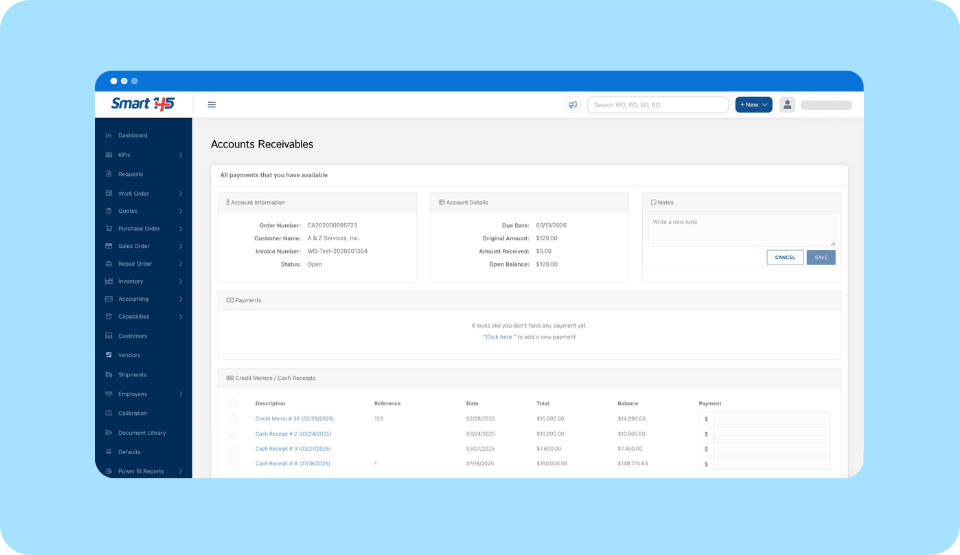
At this point, the lifecycle of the Work Order is complete: the unit has been repaired, certified, invoiced, and shipped back to the customer, with every operational and financial stage recorded within the same integrated system.
Managing the aircraft component repair workflow is never just about the technical work. Every stage — from intake to final shipment — generates decisions, costs, and documentation that have to stay connected across teams.
As work order management software for aviation, Smart 145 ties everything, parts, labor, purchasing, certifications, invoicing, and shipping, to the same Work Order from the moment the unit arrives until it leaves. That's how repair stations maintain full traceability and control over both operations and financials.

Work Order Management for MRO — Frequently Asked Questions
What is work order management for MRO?
A short definitional answer (50-60 words). This is the snippet bait we flagged as missing, repurposed as a FAQ entry. High GEO value.
What documents are required to close a work order in a Part 145 repair station?
Answer references FAA Form 8130-3, EASA Form 1, UK CAA Form 1 — regulatory content AI engines love to cite, already in the article body.
What is the difference between a Work Order and a Repair Order in aviation MRO?
This question gets searched and the article already explains both concepts — a FAQ entry just makes it extractable.