Aviation ERP Replacement: Transitioning Without Disruption

An aviation ERP replacement is not just a software decision. In an MRO environment, it affects how work orders move, how parts are traced, how compliance records are protected, and how teams keep daily operations running as the underlying system changes. For repair stations, the goal is not simply to “go live” on a new platform. The goal is to transition without interrupting the work, weakening documentation, or losing the historical traceability that the operation depends on.
An aviation ERP is the system that brings together the daily work of an MRO, connecting parts, workflows, records, compliance, and communication in one place so operations can move with clarity.
Why ERP Replacements Fail in MRO Environments
ERP replacements fail when the transition is treated as a technical migration instead of an operational change. Common failure modes include accounting scope mismatch, skipping discovery, incomplete documentation, and no defined internal owner. These issues are industry-wide patterns, not vendor-specific incidents, and they usually surface when go-live pressure replaces structured planning.
An MRO is too interconnected for a rushed changeover. Work orders, parts, forms, accounting touchpoints, serialized records, and compliance documentation all rely on each other, which means an MRO software changeover needs structure before speed.
Step 1: Define What You're Actually Replacing
Most repair stations begin an aviation ERP replacement by asking what system they want next. The better first question is what they are actually replacing. Before migration begins, the shop must separate operational needs, accounting requirements, historical records, forms, workflows, and reporting expectations.
Operational data vs. accounting data
The most common scoping mistake is treating MRO operational data and accounting data as the same thing. They are connected, but they do not serve the same purpose.
Operational data includes work order history, part movement, serialized records, inspection details, customer documentation, repair steps, forms, certifications, and traceability records. Accounting data focuses on invoices, payments, financial reporting, cost structures, and reconciliation. When these areas are confused, the project can quickly become too broad, too slow, or misaligned with the real reason the repair station needed a new system in the first place.
This is why the differences among aviation MRO software, ERP, and CRM systems matter during transition planning. A repair station needs to know whether it is replacing an operational platform, an accounting process, a customer-management tool, or a combination of systems that have slowly become tangled together.
At Smart 145, this boundary is addressed during intake because it has been defined in previous implementations. If the project starts with the wrong scope, the migration can still move forward, but the result may not solve the operational problem the shop set out to fix.
Choosing the right migration type for your shop
Not every MRO needs a full migration. A small shop with limited historical data, clean records, and a simple workflow may need a different transition path than a larger repair station moving years of serialized parts, completed work orders, customer history, and attached documents.
The right migration type depends on shop size, data maturity, current system condition, historical traceability needs, and available internal resources. Some teams need a focused data import. Others need a deeper historical migration. Some need to start clean and keep the legacy system available for reference. Others cannot operate without a more complete transfer of operational records.

At Smart 145, migrations are defined by how much historical information a repair station wants to bring into the new system. Some teams choose a full migration that carries over their complete operational history, allowing them to continue exactly where they left off. Others prefer a lighter start, moving only the essentials such as customers, vendors, and inventory.
That distinction shapes the project timeline, data expectations, and implementation sequence. It also helps prevent one of the biggest risks in aviation ERP transitions: assuming every shop should follow the same migration path.
Step 2: Prepare Your Data Before Migration Starts
Data readiness is underestimated in almost every MRO ERP migration. Many operators assume their data is “fine” because they use it every day. But usable data and migration-ready data are not the same thing.
What must transfer without gaps?
For a Part 145 repair station, some records are too important to move casually. Work order history, serialized records, FAA Form 8130-3 documentation, shelf-life data, customer records, parts history, and compliance-related attachments need special attention because they affect traceability and audit readiness.
If these records are incomplete, misplaced, or disconnected during an ERP data migration aviation project, the impact is not only administrative. It can create compliance exposure, slow customer responses, and weaken confidence in the new system before the team has fully adopted it.
The goal is not to migrate everything simply because it exists. The goal is to identify what must transfer without gaps, what can remain archived, what needs cleanup, and what should not be carried into the new environment at all.
Why does the WO package come first?
A completed work order package is one of the most useful validation tools in an ERP transition. It shows what the shop actually needs to document, how forms are used, which fields matter, where approvals appear, and how traceability is expected to look when a job is complete.
This matters because data and forms cannot be evaluated separately. A database may look clean until it is tested against the forms the repair station actually uses. A form may look complete until the required data is missing, inconsistent, or stored in the wrong place.
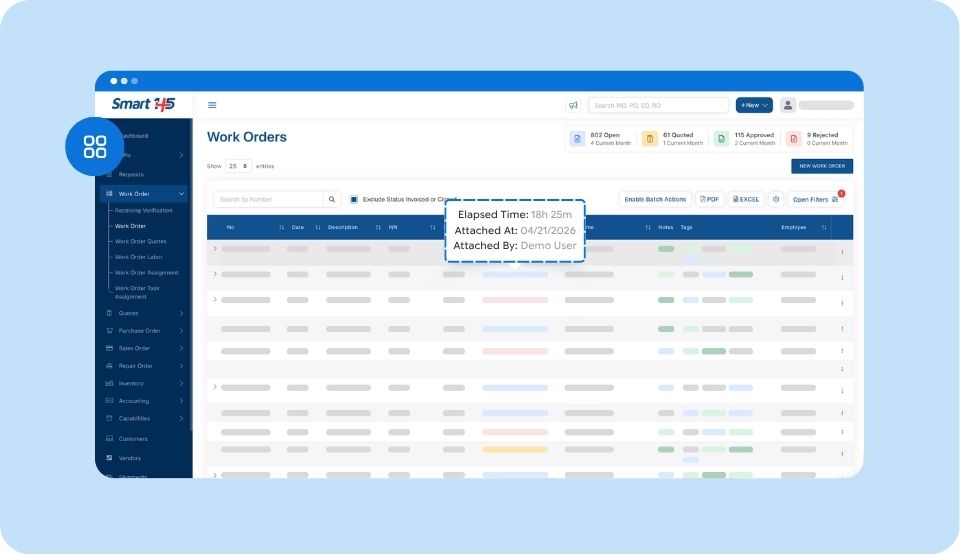
Smart 145 requests a completed WO package at intake for exactly this reason. It allows the team to review data requirements and form expectations early, before the migration or configuration process turns small assumptions into expensive rework.
Step 3: Run Discovery Before Touching Configuration
Structured discovery is the step many MROs try to shorten. It is also the step that prevents the most rework. Before configuration begins, the implementation team needs to understand how the repair station actually operates, not only how the process is described on paper.
Mapping current workflows to the new system
There is often a gap between what a shop thinks it does and what the team actually does every day. A manager may describe the official process, while technicians, buyers, coordinators, and QC inspectors know the exceptions, shortcuts, and handoffs that keep the operation moving.
Discovery closes that gap before it becomes a configuration problem. It identifies where work orders begin, how parts are requested, when documents are attached, who approves each step, where forms are generated, and how completed jobs move toward invoicing or delivery.
For an ERP transition Part-145 environment, this step is especially important because operational convenience cannot come at the expense of traceability. The new system should support the way the shop needs to work while helping the team keep records structured, complete, and consistent.
What a discovery session should cover
A proper discovery session should cover data review, workflow confirmation, form alignment, role responsibilities, reporting needs, exception handling, and gap identification. It should also clarify what must be ready for day one and what can be handled after go-live.
At Smart 145, discovery happens before the build starts. That timing matters. Hard questions asked during discovery cost very little compared with the same questions raised halfway through configuration, when forms, permissions, data imports, and workflows may already be built around the wrong assumptions.
The best discovery sessions are not theoretical. They use real examples: a completed work order, a common repair scenario, a purchasing exception, a serialized part movement, a customer document, or a form the shop cannot operate without.
Step 4: Build Migration and Forms in Parallel
Many ERP transitions treat migration and forms as separate phases. First, the data moves, then the forms are reviewed. In an MRO environment, that sequencing often doubles the timeline and creates avoidable rework.
Migrating serialized parts, 8130-3s, and WO history
Traceability records are the most sensitive data in any MRO migration. Serialized parts, 8130-3s, work order history, part movements, inspection records, and attached documentation need to remain connected in a way that still makes sense after the transition.
A complete migration is not only about moving fields from one system to another. It is about preserving the operational story behind the record. A serialized component should not lose its relationship to the work order, the customer, the certification, the part transaction, or the documentation that supports its movement.
For a Part-145 operation, compliance-ready migration means the new system can support the same traceability expectations the shop had before the transition, without forcing the team to reconstruct history from disconnected files.
Which forms go live first — and which wait
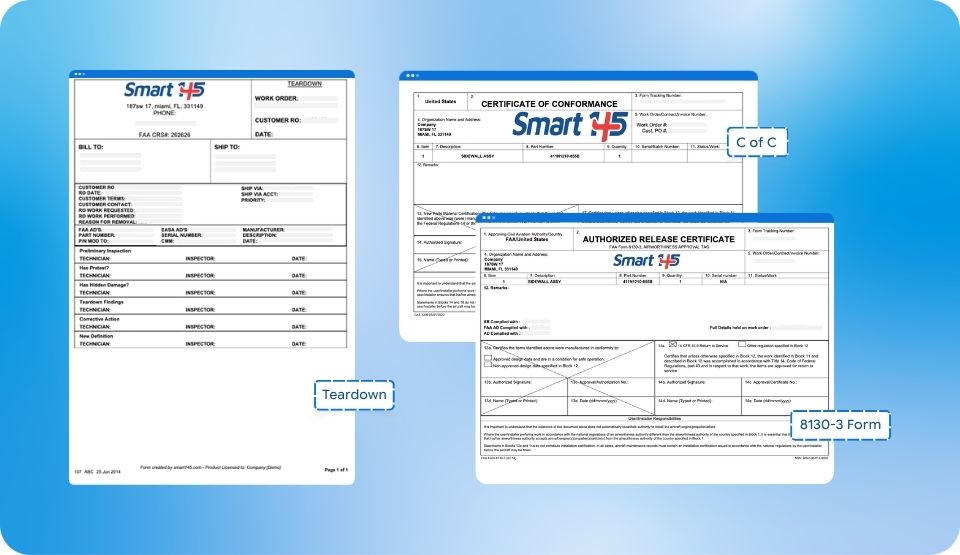
Forms can delay an implementation when every document is treated as equally urgent. In practice, a repair station needs a minimum viable form set to operate from day one. That usually means the forms directly tied to opening, processing, documenting, approving, and closing work.
Other forms may matter, but they do not always need to block go-live. Some can be refined after the core workflow is stable. This prevents the project from being held back by documents that are important, but not essential to the first operational cutover.
Smart 145 builds a standard set of forms at every implementation. Anything outside that standard set is scoped after go-live to avoid delaying the transition. This approach keeps the project focused on what the shop needs to operate safely and consistently from day one.
Step 5: Validate in a Test Environment First
Validation is often where transitions get compressed under timeline pressure. But in an aviation ERP replacement, validation is not a formality. It is the gate that determines whether the repair station is ready to move from preparation to live operation.
Data review against forms before any go-live decision
Data and forms must be validated together. A clean database tested against broken forms is still a failed go-live. So is a polished form set connected to incomplete, inconsistent, or poorly mapped data.
Before any go-live decision, the shop should test the migrated data against the forms and workflows that will be used in real operations. That means checking whether work order details appear correctly, serialized parts remain traceable, certificates attach where expected, shelf-life information is visible, and required fields support the actual process.
At Smart 145, a go-live date is not scheduled until both the data and forms have cleared validation in the test environment. That protects the repair station from discovering basic operational issues after the team has already committed to using the new system.
Training: when, who, and how many sessions
Training is not only about showing users where to click. It is about helping each role understand how the new system supports their part of the workflow.
Timing matters. If training happens too early, users forget the details before going live. If it happens too late, the team enters cutover week without confidence. For complex migrations, two sessions often work better than one: the first for system familiarity, the second for full workflow execution.
The audience matters too. Technicians, buyers, QC inspectors, managers, and administrative users do not require the same training. They need to understand the parts of the system that affect their daily responsibilities and the handoffs that depend on them.

Step 6: Treat Cutover Week as a Priority Event
Go-live week is where trust is built or lost. A repair station may accept a learning curve, but it cannot accept silence, slow response, or uncertainty while open work, parts, and documentation move through the new system.
What to monitor in the first 48 hours
The first 48 hours should be closely monitored because this is when the most important operational signals emerge. The team should watch open work orders, parts transactions, inventory movements, document attachments, form generation, user access, approvals, and compliance documentation.
A practical checklist should include:
- Are open work orders moving through the correct steps?
- Are technicians able to document work without leaving the system?
- Are parts being issued, received, or consumed correctly?
- Are serialized records staying connected to the right jobs?
- Are the required forms generating with the expected data?
- Are 8130-3s and related documents accessible where users need them?
- Are buyers, QC, and managers seeing the information they need to make decisions?
This is not only a technical review. It is an operational confidence check.
How does go-live week set the tone for the long-term relationship?
The MRO’s confidence in the new system is shaped almost entirely by the go-live week. If users feel supported, issues are addressed quickly, and the system behaves as expected, adoption becomes easier. If the team feels alone, even small problems can become reasons to return to old habits.
Smart 145 treats go-live week as the highest-priority event across the team. That means proactive monitoring, same-day response, and no waiting while the repair station is trying to operate. The goal is not only to resolve tickets. It is to protect momentum during the most sensitive part of the transition.
A controlled cutover gives the shop space to build confidence. It also helps leadership see where the new system is working, where users need support, and which adjustments should be made early, before workarounds form.
Migrating from Quantum, Pentagon, or Legacy Platforms
Legacy platform migrations often involve technical and logistical constraints that newer system transitions do not. Operators moving from Quantum, Pentagon, or other older platforms may need extra coordination around data access, extraction, contractor involvement, and accounting boundaries.
Quantum migrations: extraction and contractor coordination
Quantum migrations can require contractor coordination when the source system needs specialized involvement for data extraction. That means the repair station may need to manage access, timing, permissions, export requirements, and communication between the legacy-system contractor and the implementation team.
The key is to clarify responsibilities early. Who extracts the data? What format will be delivered? What records are included? What documentation is attached? How long will the extraction take? What does the contractor need from the MRO to begin?
These questions should be answered before the migration timeline is finalized. Otherwise, the project can appear ready on the new-system side while still waiting on legacy data access.
Pentagon migrations: scope, billing, and timeline
Pentagon migrations can also involve contractor-to-customer arrangements, depending on how data is accessed and extracted. The repair station needs to understand what it is responsible for, what the contractor will provide, and how the timeline depends on external availability.
Scope is especially important. The MRO should confirm whether the migration includes operational records, documents, historical work orders, parts data, customer information, or only specific exported datasets. It should also clarify where accounting data begins and ends, because that boundary can affect both billing and expectations.
For any legacy migration, the safest approach is to define the source system's responsibilities before committing to a go-live timeline. The transition is easier to control when the repair station knows what data it can access, when it can access it, and what condition it will be in upon arrival.

Common ERP Replacement Mistakes in Repair Stations
Most ERP replacement mistakes are not dramatic. They are practical, predictable, and usually visible before the project begins.
A repair station poses risk when it begins migration before defining scope, assumes accounting and operational data are identical, skips discovery, underdocuments, delays form review, assigns no internal owner, or treats go-live as a technical switch rather than an operational event.
A controlled aviation ERP replacement avoids those mistakes by slowing down at the right moments: before the scope is finalized, before data is moved, before configuration starts, before go-live is scheduled, and during the first week of live use. That discipline is what protects operations, compliance, and historical traceability during an MRO ERP migration.
The goal is not to make the transition feel bigger than it is. The goal is to make it sufficiently controlled so that the repair station can keep working while the system beneath it changes. A repair station creates risk when it:
- Starts migration before defining the scope
- Assumes accounting and operational data are the same
- Skips discovery
- Underestimates documentation
- Assigns no internal owner
- Treats go‑live as a technical switch instead of an operational event
A controlled aviation ERP replacement avoids those risks by slowing down at key moments:
- Before the scope is finalized
- Before any data is moved
- Before configuration begins
- Before the go‑live is scheduled
- During the first week of live use
The goal isn't to make the transition feel bigger than it is. It's to keep it sufficiently controlled for the repair station to continue operating while the system beneath it changes.
A controlled aviation ERP replacement protects the records, workflows, forms, and traceability that keep a repair station moving. The smoother the transition, the easier it becomes for teams to trust the system from day one.
For teams preparing for that kind of transition, the next step is to understand how the right tools and approach can support a change that remains stable while everything else moves forward.