Smart 145 Q4 2025 Feature Releases: 3 Enhancements for Aviation ERP Software Operations
At Smart 145, Q4 2025 was about reinforcing what matters most in Aviation MRO operations: control, clarity, and confidence in your daily workflow. The features delivered this quarter were practical improvements to our aviation ERP software, designed to support the real challenges repair stations and parts suppliers face every day.
Many of these improvements came directly from conversations with our community. From accounting teams seeking stronger financial discipline to shop managers needing clearer work order traceability, your feedback shaped the upgrades we prioritized. Now, let's take a closer look at the three features that made the biggest difference across Aviation MRO operations this quarter.
What Aviation ERP Software Features Did Smart 145 Release in Q4 2025?
Smart 145's Q4 2025 release delivered three enhancements to its aviation ERP software: a fully expanded accounting module with financial reporting and payment management; work order governance features covering process step tracking, role-based access restrictions, and tag traceability; and work order identification tools, including editable prefix and suffix support.
Accounting and Financial Control Inside the Smart 145 ERP System
Financial control should never feel disconnected from operations. This is one of the most consistent gaps in legacy aviation maintenance software, and one Smart 145 has made a priority to close, allowing Aviation MROs to manage financial activity without relying on fragmented systems.
Full Accounting Module Expansion and Financial Configuration
The Accounting Module has grown into a complete financial management environment. Every user action in Smart145 that requires a financial impact is now automatically converted into a structured accounting transaction, updating the corresponding ledger accounts and keeping financial records fully aligned with operational activity.
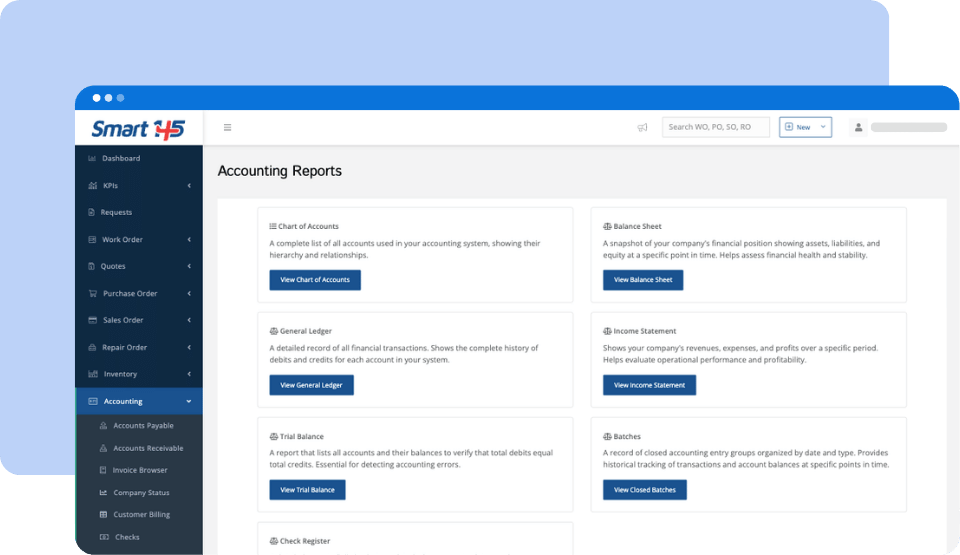
With configurable account structures, payment methods, budgets, journal management, and reconciliation controls, teams have more flexibility without sacrificing structure. And with built-in financial reports like the Balance Sheet, Income Statement, General Ledger, Trial Balance, and bank reconciliation tools, tied directly to the work being executed.
Cash Receipts Management and Transaction Application
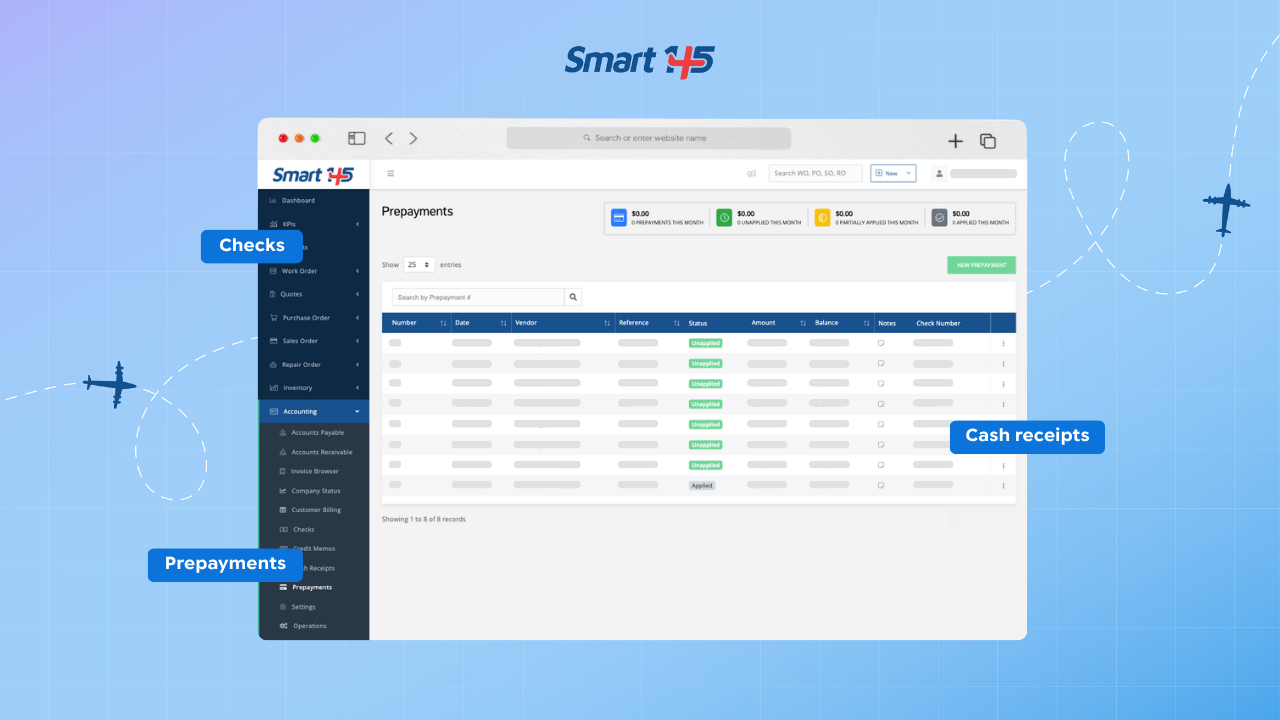
Cash receipts and vendor prepayments can now be registered directly within the Accounting module. This allows teams to register incoming payments without exporting data or relying on external accounting tools.
These entries begin as open credits —whether from customers or to vendors— and are later applied to their corresponding Accounts Receivable or Accounts Payable documents. This ensures that anticipated payments are properly tracked, controlled, and accurately reflected in financial records.
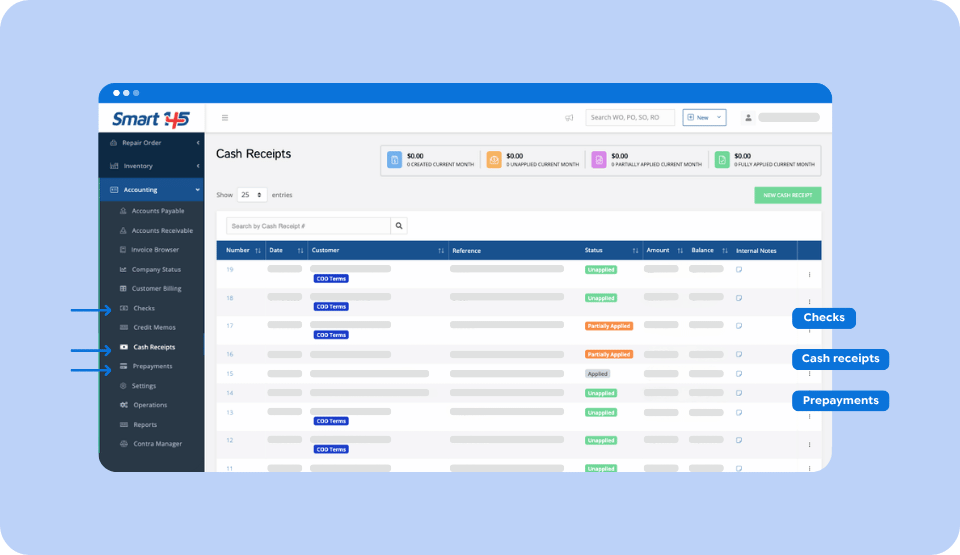
Within the same system that manages work orders, sales, and purchasing activity, payments can be allocated to their corresponding transactions. Financial records remain centralized and aligned with operational events.
Real-Time Vendor Credit Limits and Balances
Vendor credit limits and outstanding balances are visible in real time directly within the platform. Before confirming a new purchase order or outside service, users can see the company’s current balance with that vendor and how it compares to the approved credit limit.
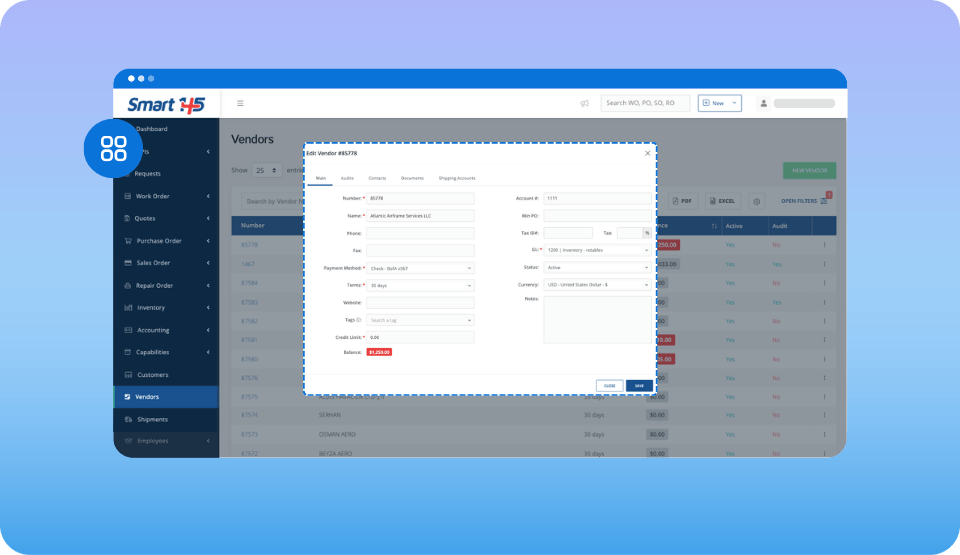
During purchasing or subcontracted work, procurement teams get immediate visibility into existing commitments and available credit, all within the same environment where operational and financial decisions are made. By validating credit exposure upfront, MRO teams reduce financial risk, avoid unexpected overages, and keep procurement aligned with the company’s actual financial position.
Work Order Governance and Process Accountability in Aviation MRO
In any Aviation MRO, work orders are where coordination, compliance, and execution converge. And we understand that strengthening visibility and control at this level is essential. So the real question is: what have we built to reinforce it?
Process Step Tracking with User and Timestamp Visibility
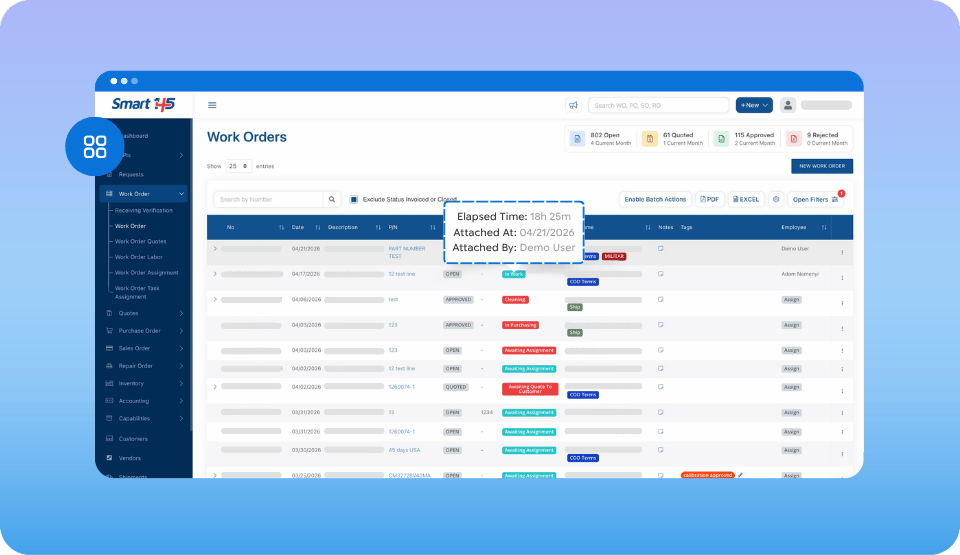
Each time a Work Order is moved to a different process step, Smart 145 automatically records the update within the system. The platform captures who made the change, when it occurred, and displays how long the Work Order has remained in its current step. This creates a chronological record of workflow progression that can be reviewed at any time. Supervisors and quality teams can clearly see when the Work Order entered a stage, who moved it there, and how long it has been in that process step.
Role-Based Restrictions for Work Order Process Steps
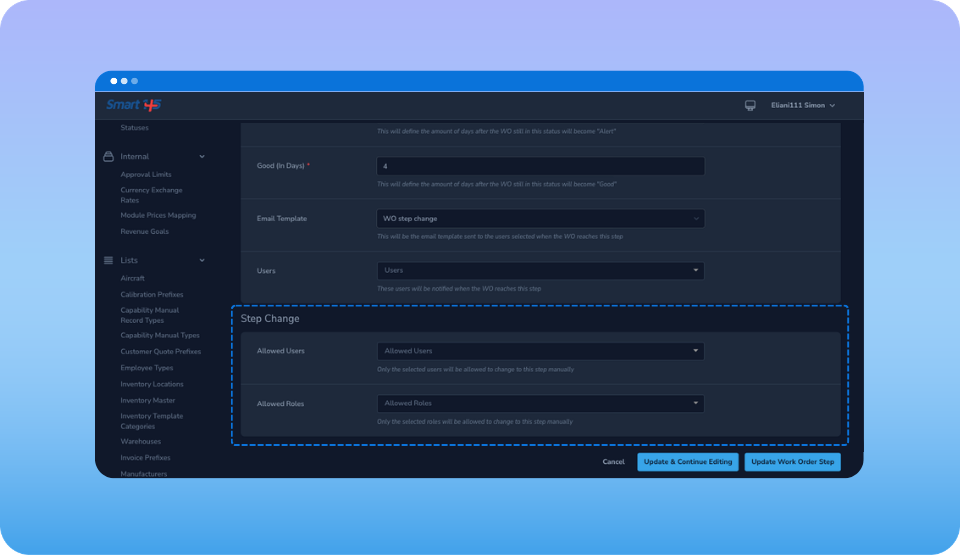
Smart 145 can now be configured to restrict which users or roles are allowed to move a Work Order into specific process steps, ensuring that critical workflow stages remain under proper authorization. These permissions are configured directly within the workflow structure. As work orders move forward, governance is automatically enforced by the system.
Work Order Tags for Operational Traceability
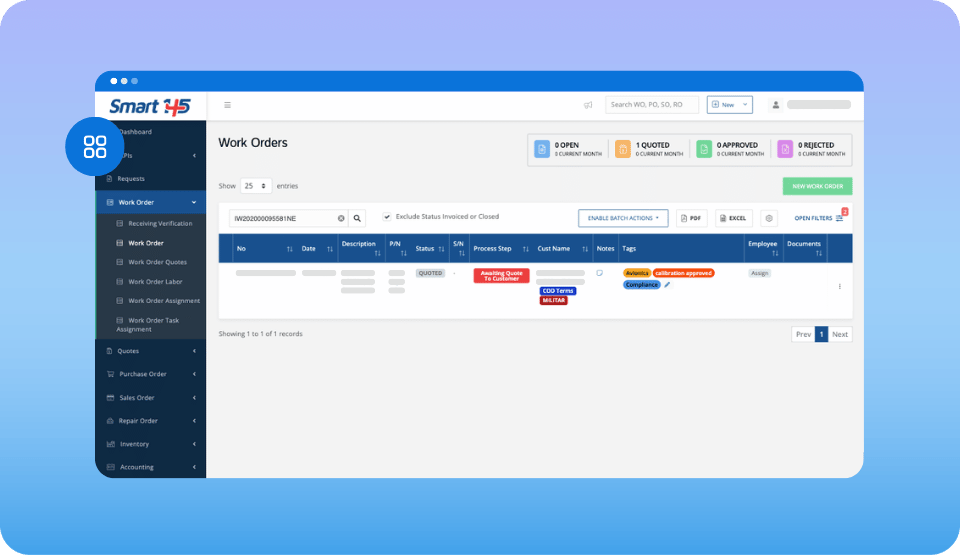
Each time a tag is assigned or updated on a Work Order, Smart 145 records who performed the action and when it occurred, creating a traceable history of tagging activity within the order. Tags often represent priority levels, classifications, or special handling requirements. Documenting when and by whom they are applied or modified adds clarity to operational decisions.
Work Order Identification and Configuration Flexibility — Bringing Precision to Aviation MRO
As aviation maintenance operations grow and evolve, identification systems within the MRO ERP software behind businesses need to adapt without causing confusion. The following updates provide that flexibility while maintaining structure.
Editable Work Order Prefixes After Creation
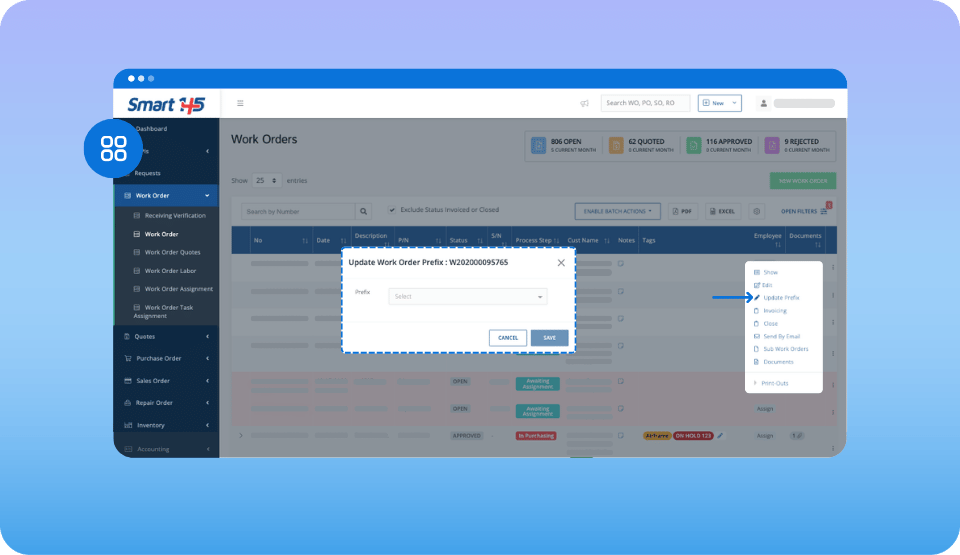
Work order prefixes can now be updated even after a work order has been created. This allows teams to adjust identification structures without recreating documentation. The numbering framework remains structured within the system while historical data is preserved. Identification logic can evolve without disrupting existing records.
Work Order Suffix Support for Advanced Identification
Support for work order suffixes has been added to the platform. This expands how work orders can be differentiated and classified. Suffixes can distinguish revisions, related service events, or variations within a structured format. The enhancement improves clarity without complicating the numbering logic.
How These Q4 2025 Enhancements Support Mature Aviation MRO Operations
The three areas addressed in this release — financial control, work order governance, and identification flexibility — are not independent improvements. They reflect a consistent direction: giving Aviation MROs the operational structure they need to run with precision.
In a mature repair station, financial decisions and operational decisions are never truly separate. When accounting, purchasing, and work order data live within the same aviation ERP software environment, the gaps between departments close. Reconciliation happens faster. Credit exposure is visible before it becomes a problem. Financial records stay aligned with the work actually performed.
Work order governance follows the same logic. Traceability, role-based access, and tag documentation aren't features you add when something goes wrong — they're the foundation of a process-driven shop that can withstand audits, scale capacity, and maintain consistent quality standards under 14 CFR Part 145.
Identification flexibility may seem like a smaller detail, but for operations managing multiple aircraft types, recurring service events, or growing customer portfolios, it's the difference between a numbering system that adapts and one that forces workarounds.
If you're evaluating how your current aviation repair station software handles any of these areas, our guide to aviation MRO software for repair stations is a useful starting point for understanding what a structured platform should deliver.